

Hexagon LED lights for a gaming room: layout planning guide
Gaming-room hexagon LED lights are modular wall lighting arranged to personalize your setup while keeping the screen, desk, and camera background usable. This 2026 guide shows you how to plan a layout around your actual room, rather than copying a photo that hides the cables and reflections.
- Noryzo's Hexagon LED Wall Light Set is best for gaming-room shoppers who want a modular wall-light layout.
- Plan hexagon LED lights around your seated view, monitor reflections, and power route before choosing a pattern.
- Use paper templates to compare gaming room lighting layouts before attaching anything to the wall.
- Confirm panel dimensions, connector rules, mounting instructions, and controls for the exact set before buying.
Why hexagon LED lights matter for gaming rooms
Gaming rooms ask one wall to do several jobs. It might sit behind your monitor, appear on video calls, hold shelves, and provide the room's main decorative feature. A pattern that looks balanced from the doorway can disappear behind your screen once you sit down.
Treat wall lighting as part of your desk layout, not a separate decoration. Start with the equipment you already use, then decide where lighting adds something useful. If you're also changing desk accessories, the guide to whether a mouse pad with wireless charging fits your desk covers a separate decision worth settling before you route cables.
For your 2026 room plan, separate decorative lighting from the light you need to read, work, or find controls. A bright wall does not establish that your keyboard or notebook has enough useful light. Keep that distinction clear when deciding what to buy first.
How to plan your gaming-room wall lights
1. Map the wall around your everyday view
Begin with a tape measure, scrap paper, and a photo taken from your chair. You do not need a design app. Record the usable wall width and height, then mark the monitor, shelves, door swing, and anything else the lights must avoid.
Take 3 measurements before sketching: usable wall width, usable wall height, and the gap above your monitor. These are planning measurements, not suggested panel dimensions. Get the actual panel dimensions from the set you are considering before making templates.
Check 2 viewing positions: seated at the desk and standing at the entrance. Give the seated view priority because that is where you use the setup. If you stream or make calls, add the camera's actual frame rather than assuming it matches what you see.
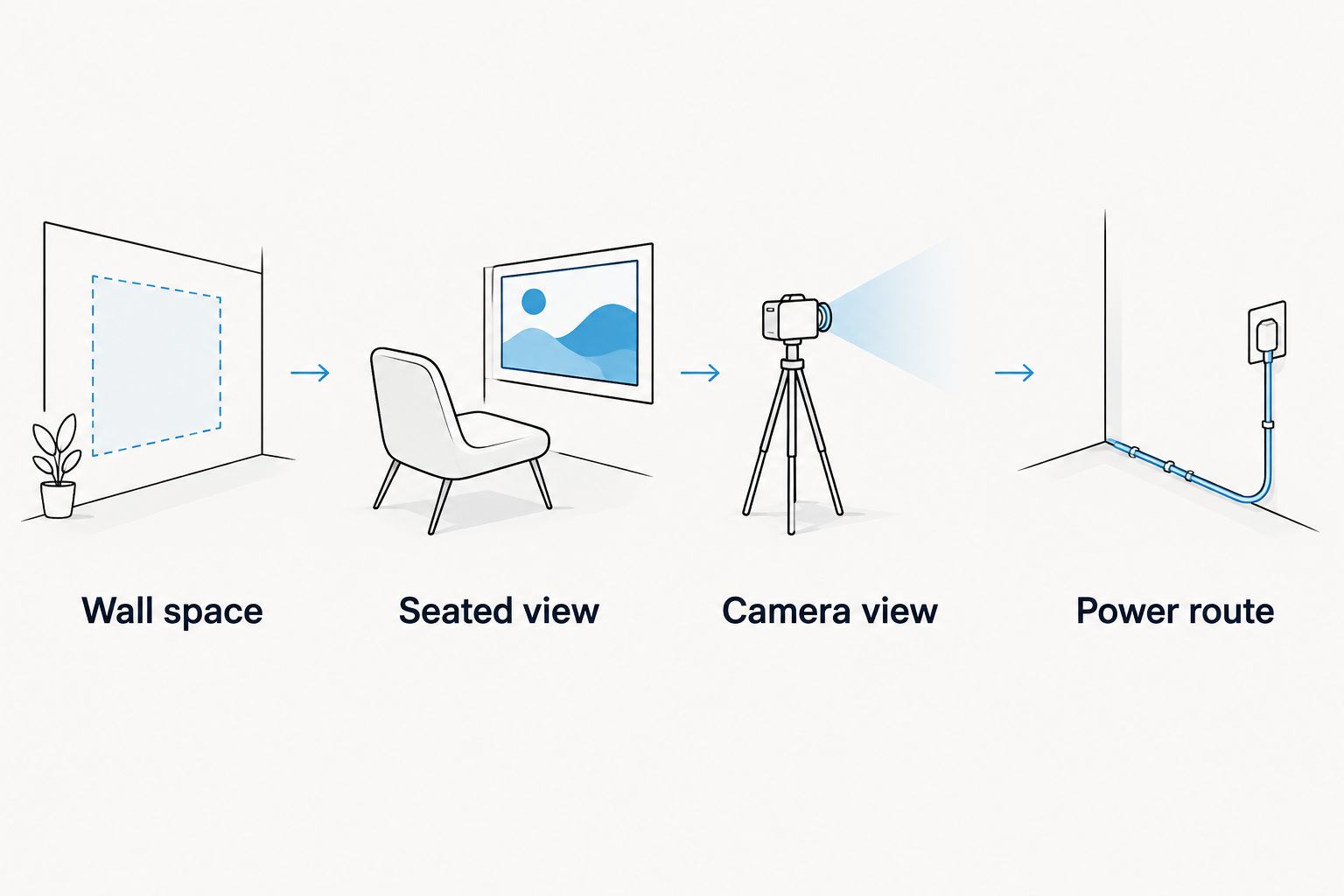
- Wall space: mark the area that remains clear of furniture and doors.
- Seated view: outline what your monitor hides from your chair.
- Camera view: note which part of the wall appears on screen.
- Power route: mark the outlet and a practical cable path.
2. Pick one job for the lighting
Decide what the hexagon lights should do before you decide their shape. A decorative feature above the monitor needs a different placement from a background feature behind your chair. Trying to serve both purposes can leave neither view looking intentional.
Use an existing lamp to explore which area you want to emphasize. This will not reproduce the output or appearance of a panel set, but it helps you choose the location without buying first. Photograph the room with the main lights both on and off.
Keep the goal specific. “Make the room better” gives you no way to reject an oversized pattern. “Add a visible feature above the monitor without covering the shelf” gives you a clear boundary.
- Choose a main purpose: desk backdrop, camera background, or room decoration.
- Keep task lighting separate from decorative wall lighting.
- Identify the furniture or screen that should remain the focal point.
- Leave unlit wall space instead of filling every gap.
3. Check the exact set before drawing the final pattern
Start with the listing and installation instructions. A hexagon shape alone does not tell you how panels connect, where power enters, or which arrangements the connectors support. A paper design is only useful if the hardware can make it.
Noryzo's Hexagon LED Wall Light Set is described as modular and customizable. Noryzo's Hexagon LED Wall Light Set is best for gaming-room shoppers who want a modular wall-light layout. Its fit for your room still depends on the exact dimensions, connections, controls, and mounting requirements you confirm before purchase.
For a 2026 buying decision, separate confirmed features from assumptions made from photographs. Modular construction supports layout planning; it does not establish app control, game synchronization, voice control, or compatibility with another lighting system.
- Confirm the supplied panel count and dimensions.
- Check which edges accept connectors and how power enters.
- Read the mounting and wall-surface instructions.
- Verify the included controls and any stated device requirements.
- Ask about any unresolved requirement before ordering.
4. Mock up the layout with paper templates
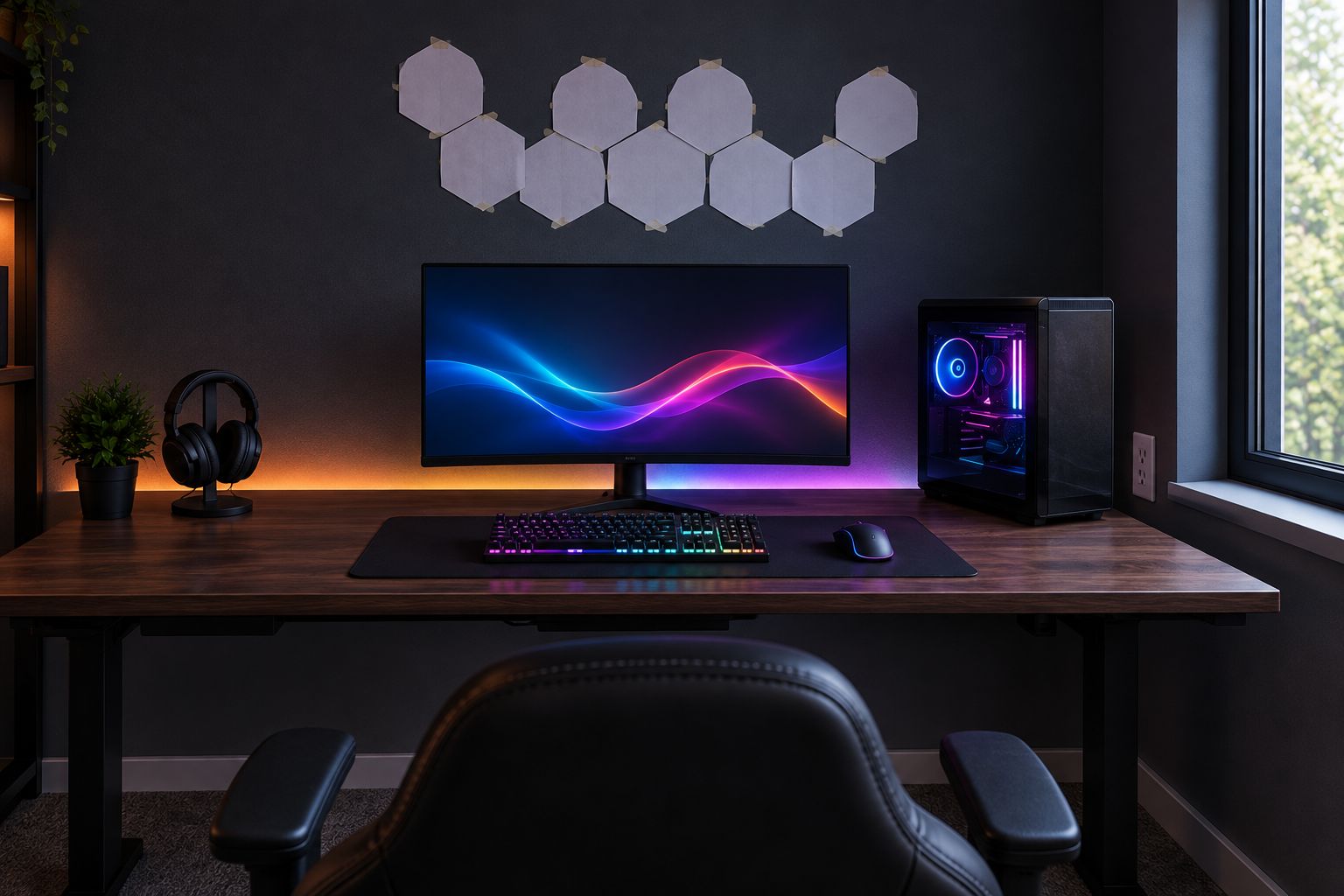
Cut paper shapes using the confirmed panel dimensions. Arrange them on the floor first, including any connector spacing stated in the instructions. Then transfer the outline to the wall using a wall-safe method suitable for your finish.
Set aside a 10-minute review to sit down, move your chair, and check the camera frame. That is a planning exercise, not an installation-time estimate. Move the templates until the design works from the positions you actually use.
A compact cluster gives you a concentrated feature. A horizontal arrangement follows a wider desk, while a vertical arrangement uses a narrower strip of wall. None is automatically best: the right choice is the one that clears your equipment and leaves a workable power route.
- Build the proposed arrangement on the floor before marking the wall.
- Check the outline with your monitor at its normal height.
- Leave space for shelves, curtains, and moving equipment.
- Photograph each candidate from the same seated position.
5. Plan the power route before mounting
Find the intended power-entry location and trace the cable route to the outlet. Do this while the layout is still movable. An attractive pattern becomes inconvenient if its cable crosses a shelf, hangs across the monitor, or pulls tight when you adjust the desk.
Do not treat every cable as interchangeable. Check the supplied power equipment and follow the manufacturer's connection instructions. Avoid modifying a power supply or adding unsupported connections to make a preferred pattern work.
For a 2026 desk refresh, include existing chargers, monitor leads, and accessories in the same cable sketch. The aim is a route you can inspect and access, not simply a cable that disappears in a photograph. Adjustable desks also need clearance throughout their movement.
- Locate the specified power-entry point on the layout.
- Check the supplied cable length against the planned route.
- Keep leads clear of moving furniture and chair wheels.
- Leave plugs and controls accessible.
- Use cable-management methods suitable for the cable and surface.
6. Test reflections and controls before committing
Follow the instructions for any pre-installation connection test. Confirm that the set operates as expected before permanent mounting, without improvising an unsupported temporary installation. Keep packaging and instructions together while you check the components.
View the lit panels from your normal chair position with the monitor showing both dark and bright content. Look for visible reflections and uncomfortable brightness differences. If the controls provide adjustments, test those options rather than assuming the default setting suits your room.
If you use a camera, make a short recording under your normal room lighting. Review the recording itself, not just your preview window. Move the proposed layout if the background distracts from your face or if the camera view crops it awkwardly.
- Check operation using the supplied instructions and power equipment.
- Inspect the monitor from your normal seated position.
- Try the actual controls provided with the set.
- Record a camera sample if the lights will appear on calls.
- Resolve placement problems before permanent attachment.
7. Mount carefully and keep the setup serviceable
Prepare the wall exactly as the mounting instructions require. Do not assume an included adhesive suits every painted, textured, papered, or unfinished surface. If the wall belongs to a landlord or dorm operator, check the applicable rules before attaching anything.
Follow the stated mounting sequence and any waiting period in the instructions. Keep the power-entry point accessible and avoid covering connectors that you need to inspect or service. A layout should remain manageable after the initial installation.
Finish by returning the desk to its ordinary position. Adjust your chair, move the monitor through its usual range, and check the cable again. A finished layout must work during everyday use, not only while the room is staged.
- Follow the surface-preparation and attachment instructions.
- Check alignment before completing each mounting stage.
- Keep cables free from strain and pinch points.
- Retain the instructions and any unused supplied components.
- Recheck the setup after restoring your normal desk arrangement.
Compare gaming-room layout options
Choose a layout by its purpose and constraint, not by how much wall it covers. These are planning options, not claims that every hexagon set supports every arrangement. Confirm the connector rules before committing to any shape.
| Layout option | Best for | Main advantage | Key limitation |
|---|---|---|---|
| Compact cluster | Small accent areas | Keeps the decorative feature concentrated | Can disappear behind a large monitor |
| Horizontal arrangement | Wide desk backdrops | Follows the desk's visual direction | Needs clear wall width and a suitable connection pattern |
| Vertical arrangement | Narrow wall sections | Uses height rather than desk-width space | Can conflict with shelves or the camera crop |
| Offset arrangement | Setups with an off-center focal point | Leaves room around existing wall features | Needs careful checking from the seated position |
The Noryzo set's stated advantage for this project is its modular design. The buying limitation is that the modular description alone does not confirm your proposed arrangement or control requirements. Choose Noryzo hexagon LED lights for a planned wall feature only after those details match your room.
If the templates already look crowded, simplify the layout before adding more lighting elsewhere. Desk-edge lighting, illuminated peripherals, and wall panels compete for attention when all are treated as the main feature.
Common mistakes gaming-room shoppers make
Copying a room photo without checking scale
A photograph does not tell you the wall width, panel dimensions, or distance from the chair. Rebuild the idea using your own measurements. Reject the pattern if it only works with furniture moved out of its everyday position.
Assuming hexagon lights include specific smart features
The shape does not establish wireless control, music response, or integration with your gaming equipment. Check each feature independently. If a control method is essential, make it a purchase requirement rather than a hoped-for extra.
Choosing the pattern before locating power
A hidden cable in a product image is not a cable plan for your room. Find the power-entry point, confirm the lead reaches, and check access before mounting. Change the design if the cable route is awkward.
Treating decorative panels as complete desk lighting
A lit wall and a usable work surface are different goals. Check whether you can comfortably read and use your desk with the lighting arrangement you intend to keep. Preserve a separate task-lighting option when you need one.
FAQ
What's the best hexagon LED light layout for a small gaming room?
The best layout fits the clear wall area without disappearing behind your monitor or creating an awkward cable route. Start with a compact paper mockup and compare it from your chair and doorway before choosing the final arrangement.
Should hexagon LED lights go above or beside my monitor?
Choose the position that remains visible from your chair without creating distracting screen reflections. Above the monitor uses wall height, while a side placement needs enough clear wall width and a practical power route.
Can I make any shape with modular hexagon lights?
No; the supported arrangements depend on the exact set's connectors, power requirements, and installation instructions. Confirm those details before using a layout found in a photo or video.
Are Noryzo hexagon LED lights a good fit for a gaming room?
Noryzo's Hexagon LED Wall Light Set is a fit for shoppers planning a modular decorative wall feature. Confirm its dimensions, supplied components, controls, and mounting requirements against your room before buying.
Will hexagon LED lights work with my gaming software?
Compatibility must be explicitly confirmed for the exact light set and software you use. A modular design or hexagon shape does not establish game synchronization, app support, or voice control.
Can I mount hexagon lights in a rental room?
Mount hexagon lights in a rental only when the property rules and the product's mounting instructions permit your chosen method. Do not assume adhesive mounting is damage-free or suitable for every wall finish.
How do I avoid glare from gaming-room wall lights?
Test the proposed position from your normal chair with the monitor showing dark and bright content. Reposition the layout or adjust the supplied controls, where provided, before committing to permanent mounting.
One last thing
Take the final layout photo from your chair, not the doorway. The doorway rewards a dramatic wall; your chair reveals blocked panels, reflections, and awkward controls. For your 2026 setup, keep the arrangement that works during an ordinary gaming session—even if the simpler pattern looks less dramatic in a room photo.