

Will a 3 in 1 wireless charging station work with your devices?
A 3 in 1 wireless charging station works with your devices only when each charging position supports the exact phone, watch, and earbud case you own. Wireless charging on your phone does not establish compatibility for your watch or earbuds. Before buying in 2026, check each device separately, then confirm the station’s power requirements and case restrictions.
- A 3 in 1 wireless charging station needs separate compatibility checks for your phone, watch, and earbud case.
- Bluetooth earbuds do not automatically have a wireless-charging case.
- Noryzo’s charging accessories suit shoppers comparing everyday tech upgrades; confirm device support before choosing.
- Check the power adapter requirements, case restrictions, and simultaneous-charging instructions before buying.
Why this matters
Buy for the devices you own, not the number of charging spots. A station that charges your phone but cannot charge your watch leaves you using another charger. That defeats part of the reason for consolidating your setup.
Noryzo’s 3 in 1 Wireless Charging Station is a relevant option to evaluate for a shared charging space. Match its current compatibility information to your exact devices before deciding. A product name describes the format; it does not establish support for every device in that category.
For a budget-conscious upgrade in 2026, start with the problem you want to solve. Fewer loose chargers, easier placement, and a dedicated bedside charging spot are different priorities. Your best choice is the setup that handles your actual routine without leaving essential devices on separate cables.
Will a 3 in 1 wireless charging station work with your devices?
Yes, if every device matches its assigned charging position and the station receives the required power. Treat compatibility as separate checks, not a single yes-or-no label for the whole station.
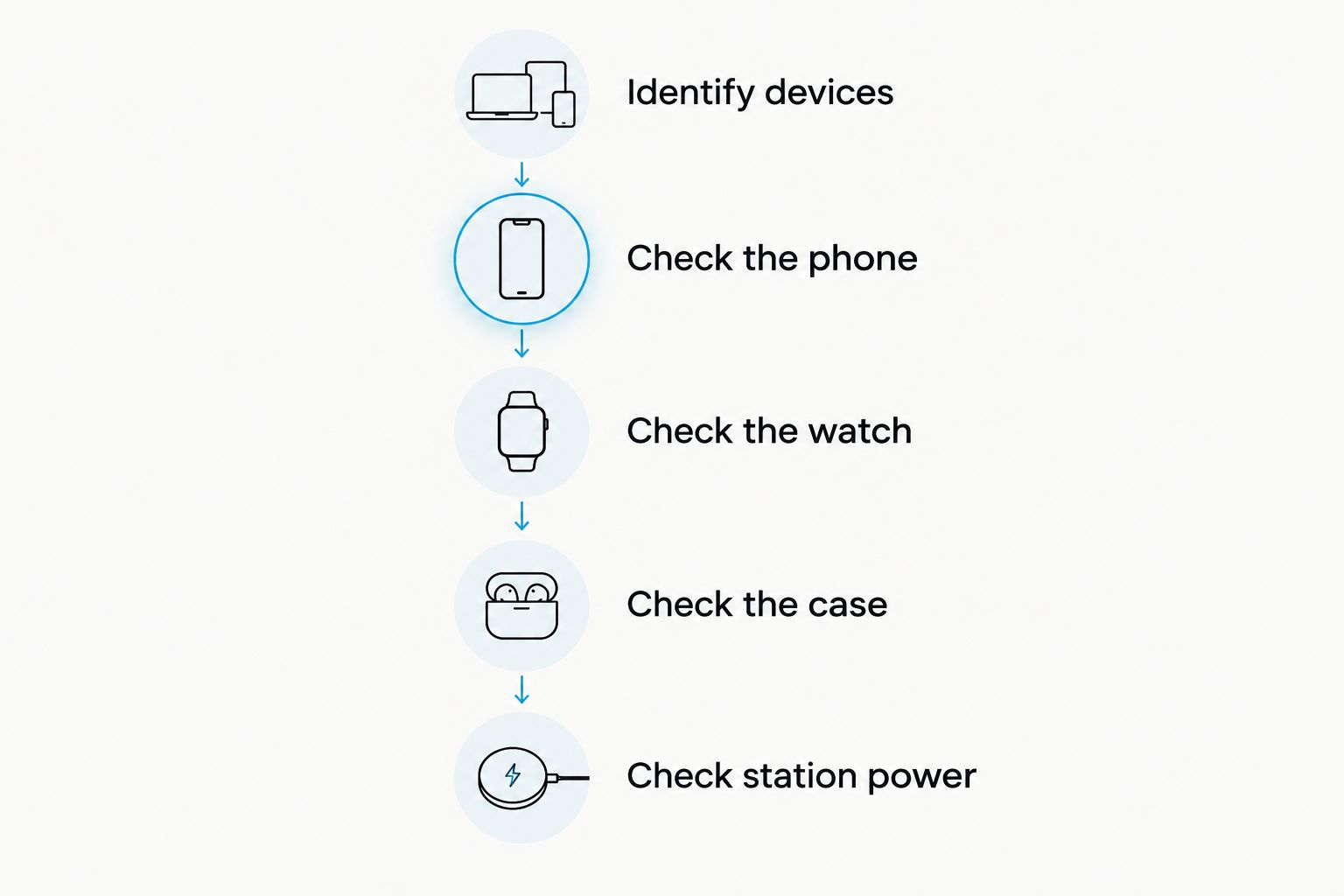
Use this sequence before ordering:
- Identify devices. Write down your exact phone model, watch model, and earbud charging-case version. Use the model information in device settings or the manufacturer’s documentation rather than appearance alone.
- Check the phone. Confirm that the phone supports wireless charging and that the station supports the relevant charging standard. Do not treat magnetic attachment as proof of charging compatibility.
- Check the watch. Look for explicit support for your watch model or series. A dedicated watch charging position does not establish compatibility with every smartwatch.
- Check the case. Confirm that the earbud case supports wireless charging. The earbuds’ Bluetooth connection tells you nothing about how their case receives power.
- Check station power. Read the adapter and cable requirements, then check what the package includes. Confirm that the instructions cover charging your devices together.
These are 3 device checks plus a station power check, not proof that any particular combination works. If a listing does not resolve one of them, get a model-specific answer before buying.
Phone compatibility: check charging support and physical fit
Start with your phone manufacturer’s specifications. Look for wireless-charging support and the named standard, then compare that information with the station’s documentation. Qi is a wireless-charging standard; Bluetooth is a wireless communication technology, not a charging standard.
Physical placement matters too. The phone must sit where the charging coils can align. A camera bump, attached grip, or case accessory can prevent the phone from resting correctly even when the underlying charging technology is compatible.
Check whether the station holds the phone upright or flat and whether that arrangement suits your routine. An upright position helps you see the screen, but you still need to confirm that your phone fits properly. Do not infer support from a product photo showing a similar-looking phone.
Watch compatibility: match the exact charging system
A phone charging pad is not automatically a watch charger. Smartwatch charging systems differ, and the watch position needs explicit support for your model.
Check whether the station contains a compatible watch charging module or requires you to install your own charging puck. Those are different arrangements. If your own puck is required, confirm that it fits and that its cable can be routed as instructed.
Your watch band also affects placement. A closed band or stiff strap can stop the watch from sitting against the charging surface. Follow the watch and station instructions rather than forcing the watch into a position that looks close enough.
Earbud compatibility: check the charging case, not the earbuds
Wireless earbuds receive audio without an audio cable. That does not mean their charging case accepts wireless power. Some earbud cases charge through a cable only.
Use the exact case version when checking support. Similar-looking cases can have different charging capabilities, so a general earbud family name is not enough. A protective cover also adds another fit check.
If you are comparing Bluetooth Earphones, keep audio connectivity and charging compatibility separate. Choose earbuds for their listening use, then verify the charging method independently. Do not assume that buying wireless audio equipment makes it suitable for a wireless charging station.
Why charging compatibility varies
In 2026, a newer device or charger is not automatically a better match. Compatibility depends on the charging system and the physical setup, not simply the release date.
Check these factors:
- Phone charging standard. Both the phone and its charging position need compatible wireless-charging support.
- Watch charging system. The watch position must support your specific watch, including any required charging module.
- Earbud case capability. The case must accept wireless charging; Bluetooth support alone is irrelevant.
- Coil alignment. The device must sit in the intended position so the charging coils can couple properly.
- Cases and attachments. Covers, metal plates, grips, and other accessories can interfere with fit or charging.
- Power source. The station needs the adapter and cable specified in its instructions, especially when charging devices together.
These checks explain why a station can work for one household’s devices but not another’s. A successful phone test does not establish watch or earbud compatibility. Evaluate the complete combination you intend to use.
Which charging setup fits your routine?
A shared station is useful when you regularly bring your phone, watch, and earbuds to the same place. It is less useful when only your phone supports wireless charging or when your devices usually charge in different rooms.
Noryzo’s charging accessories suit shoppers comparing everyday tech upgrades, but the right format depends on your devices. Compare the benefit with the limitation before committing.
| Charging option | Best for | Practical advantage | Limitation to check |
|---|---|---|---|
| 3 in 1 Wireless Charging Station | A shared charging spot for compatible personal devices | Consolidates charging into a dedicated area | Each device needs its own compatibility check |
| RGB Gaming Mouse Pad with Wireless Charging, XL Desk Mat | Desk users who want phone charging alongside their mouse surface | Combines a desk mat with wireless phone charging | Does not establish support for a watch or earbud case |
| Existing device chargers | Devices with unmatched charging requirements | Preserves the charging arrangement specified for each device | Keeps separate chargers and cables in your setup |
Choose the shared station for a shared routine, not just a cleaner product photo. If phone charging at your desk is the main goal, evaluate a desk-focused option instead. If your watch requires its own charger, keeping that charger is better than buying an incompatible replacement.
The following products provide different charging formats to compare. Their names do not replace the device checks above.


Will your phone case stop wireless charging?
Your phone case can interfere with wireless charging if it prevents alignment or introduces incompatible materials or attachments. Check the phone, case, and charger instructions together. A case being protective does not establish that it works on a particular charger.
Look beyond the case shell. Wallet attachments, metal mounting plates, finger rings, and grips can change how the phone rests. Remove accessories when the charging instructions require it, and do not place loose metal objects between the phone and charging surface.
When comparing a Phone Case for iPhone, check the exact phone fit and charging guidance rather than relying on the category name. Magnetic attachment and wireless power transfer are separate checks. A phone sticking to an accessory is not proof that it is receiving power.
Can you charge all your devices at the same time?
You can charge your devices together when the station supports that combination and uses its specified power supply. Confirm simultaneous-charging instructions rather than assuming that separate charging positions guarantee the same behavior under a shared load.
An adapter fitting the station’s port does not establish that it supplies the required power. Check the adapter’s output information against the station instructions. Also confirm whether the required adapter is included or something you need to provide.
For your 2026 buying checklist, separate compatibility from speed. A device showing that it is charging does not prove that it charges at the same rate as its original charger. Use documented charging information for your exact setup rather than expecting identical results from every power source.
What should you do if a device will not charge?
Test 1 device at a time before testing the full combination. This separates a device-specific fit problem from a problem with the station’s power supply or shared setup.
First, connect the station according to its instructions. Place the phone in the intended position and check the phone’s own charging indicator. Remove only the case or attachments that the manufacturer’s troubleshooting guidance tells you to remove.
Next, test the watch and earbud case independently. Make sure each is seated correctly. Use the device’s own charging information where available rather than treating a light on the station as proof that every device is charging.
Finally, place the compatible devices together and confirm that charging continues. If one stops, revisit the power requirements and simultaneous-charging instructions. Stop using damaged equipment, and follow the manufacturer’s safety guidance if a device or charger becomes unusually hot.
A successful check with 3 devices together is useful only for that tested combination. Repeat the compatibility check when you replace a phone, watch, case, or power adapter; changing one part can change the result.
FAQ
Will a 3 in 1 wireless charging station work with any phone?
No. Your phone must support a compatible wireless-charging standard and fit the station’s intended charging position. Check the exact phone model, case restrictions, and station documentation.
Can I charge any smartwatch on a wireless charging station?
No. The watch charging position needs explicit support for your smartwatch’s charging system. Check whether the station includes the required module or needs your own charging puck.
Do Bluetooth earbuds work on a wireless charging pad?
Only if their charging case supports compatible wireless charging. Bluetooth handles the audio connection and does not establish how the case receives power.
Can I leave my phone case on while charging wirelessly?
Keep the case on only when the phone, case, and charger instructions permit that combination. Attachments or poor placement can prevent the phone from aligning correctly.
Does a 3 in 1 charging station need a wall adapter?
The station needs the power source specified in its instructions. Check the adapter requirements and package contents before buying; a compatible connector alone does not establish sufficient power.
Is a magnetic charger the same thing as a compatible wireless charger?
No. Magnetic attachment describes how a device is held, while charging compatibility describes how it receives power. Verify both rather than treating attachment as proof of charging.
What should I check before buying a Noryzo charging station in 2026?
Check your exact phone, watch, and earbud case against the charging station’s compatibility information. Then confirm case restrictions, power requirements, and instructions for charging the devices together.
One last thing
Check your earbud case before anything else. It is easy to confuse wireless listening with wireless charging, and a cable-only case leaves part of a shared station unused.
Before ordering in 2026, save your device model names and compare them with the station’s documented support. Make the purchase only when the complete combination is confirmed. A tidy charging setup starts with a match, not an assumption.